Generate AI Voice In InShot App | InShot Me AI Voice Generate Kaise Kare | Unlimited Text To Speech Tutorial 2026
Generate AI Voice In InShot App | InShot Me AI Voice Generate Kaise Kare | Unlimited Text To Speech (2026 Guide)
Generate AI Voice In InShot App – Complete Tutorial
Aaj ke time me AI Voice ka trend bahut tezi se badh raha hai. YouTube Shorts, Instagram Reels, Facebook Videos aur TikTok style content me creators apni videos ko professional banane ke liye AI Voice ka use kar rahe hain. Agar aap bhi apni videos me bina khud voice record kiye realistic voice add karna chahte hain, to InShot App ka AI Text To Speech feature aapke liye best option ho sakta hai.
Is article me hum step-by-step seekhenge ki InShot Me AI Voice Generate Kaise Kare, AI Text To Speech ka use kaise kare aur apni videos ko professional voiceover ke saath kaise edit kare.
Download Resources
🎥 Watch Full Video Tutorial
Agar aap is tutorial ko video format me dekhna chahte hain, to hamare YouTube channel par complete step-by-step guide available hai.
📢 Join Our Telegram Channel
Latest Video Editing Presets, AI Tools, Fonts, PNGs, Trending Effects aur Daily Updates ke liye hamare Telegram Channel ko join kare.
👉 Telegram Channel:
Join Channel
👉 Inshot App Download Link:
Download Link
Important Note
InShot App ke kuch AI Voice features region aur app version ke hisab se alag ho sakte hain. Best experience ke liye InShot ko latest version me update rakhein.
InShot AI Voice Feature Kya Hai?
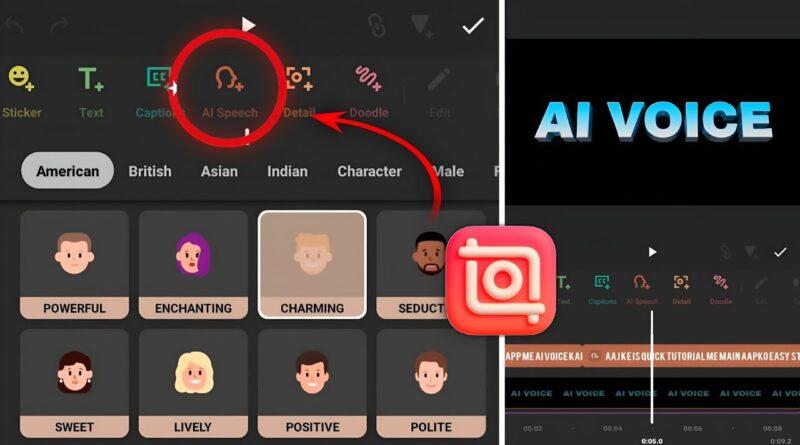
InShot ka AI Voice ya Text To Speech feature aapke likhe hue text ko automatically voice me convert karta hai. Is feature ki help se aap bina microphone ke professional voiceover create kar sakte hain.
AI Voice Feature Ke Benefits
✔ Voice recording ki zarurat nahi hoti
✔ Time bachata hai
✔ Professional sounding voice milti hai
✔ Multiple voice styles available hote hain
✔ Reels aur Shorts ke liye perfect hai
✔ Content creation ko easy banata hai
InShot Me AI Voice Generate Kaise Kare?
Niche diye gaye steps follow karke aap easily AI Voice generate kar sakte hain.
Step 1: InShot App Open Kare
Sabse pehle InShot App ko latest version me update kar le aur app open kare.
Step 2: New Project Create Kare
- Video option par click kare
- Apni video select kare
- New project create kare
Step 3: Text Add Kare
- Bottom menu me “Text” option par click kare
- Jo script ya dialogue voice me convert karna hai use type kare
Step 4: Text To Speech Select Kare
- Text select kare
- Text To Speech (TTS) ya AI Voice option par click kare
Step 5: Voice Choose Kare
InShot me different AI voices available hoti hain jaise:
- Male Voice
- Female Voice
- Natural Voice
- Narrator Voice
- Storytelling Voice
Apni video ke according best voice select kare.
Step 6: Generate AI Voice
Generate button par click kare aur kuch seconds wait kare.
InShot automatically aapke text ko voice me convert kar dega.
Step 7: Export Video
Voice generate hone ke baad:
- Volume adjust kare
- Background music add kare
- Video ko 1080p ya 4K quality me export kare
Unlimited Text To Speech Use Karne Ke Tips
Agar aap regularly AI Voice videos banate hain to ye tips follow kare:
Short Paragraph Use Kare
Bahut lambi script ko ek hi baar generate karne ke bajay chhote sections me divide kare.
Different Voices Test Kare
Har content category ke liye alag voice use kare.
Background Music Low Rakhe
AI Voice clear sunai dene ke liye music volume kam rakhe.
Caption Add Kare
Captions engagement aur watch time dono improve karte hain.
AI Voice Kis Type Ke Videos Me Use Kar Sakte Hain?
AI Voice ka use aap niche diye gaye content me kar sakte hain:
- YouTube Shorts
- Instagram Reels
- Motivational Videos
- Facts Videos
- Educational Content
- Story Videos
- News Videos
- AI Content Videos
- Business Promotions
- Product Reviews
InShot AI Voice Ke Advantages
Fast Editing
Minutes me professional voiceover ready ho jata hai.
No Recording Noise
Background noise ki problem nahi hoti.
Beginner Friendly
Koi technical knowledge ki zarurat nahi hoti.
Professional Results
Content ki quality aur presentation improve hoti hai.
Conclusion
Agar aap YouTube Shorts, Instagram Reels ya kisi bhi social media platform ke liye content create karte hain to Generate AI Voice In InShot App feature aapke liye bahut useful ho sakta hai. Iski madad se aap bina apni voice record kiye professional AI Voice Over create kar sakte hain aur apne videos ko aur bhi engaging bana sakte hain.
2026 me AI Voice content ka trend aur bhi zyada grow kar raha hai, isliye abhi se AI Text To Speech tools ka use karke apne content creation workflow ko fast aur professional banaiye.